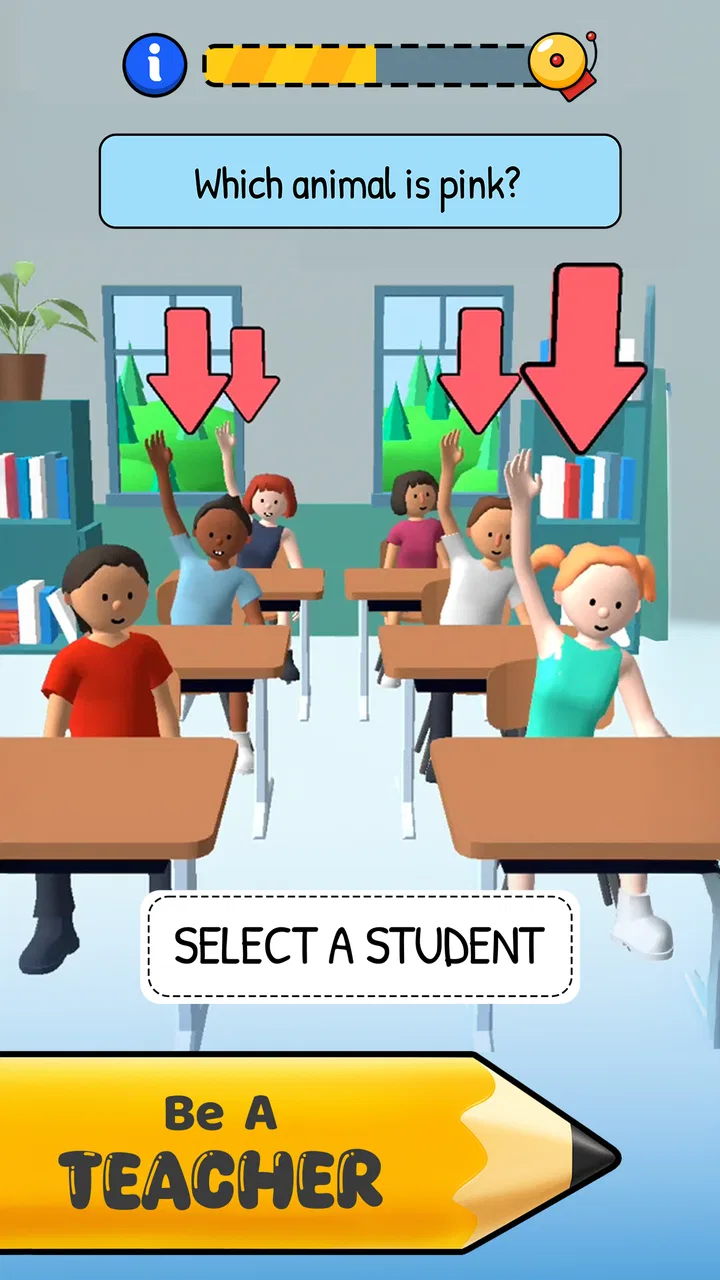
Teacher Simulator: Exam Time
- 4.5
- Rating
- 100.00M
- Installs
- Free
- Price

 Analysis by App-foxy
I approached Teacher Simulator: Exam Time as a quick simulation game rather than a serious classroom tool, and that distinction matters from the first minute. It puts me in the role of a teacher dealing with unruly students, classroom decisions, and the pressure of keeping lessons under control. The appeal is immediate: the situations are easy to understand, the presentation is light, and each short challenge gives me a clear reason to keep playing.
What makes it worth discussing beyond its simple premise is how differently it can feel depending on the player. Someone looking for a few amusing minutes between tasks may find it approachable, while a player who needs precise controls, quiet presentation, or deeper educational content may run into limits. I found it most enjoyable when I treated it as a casual, character-driven simulation with comic obstacles, not as an accurate recreation of teaching.
How the classroom experience works in practice
Kwalee Ltd developed this free simulation game for Android, and its central idea is easy to grasp: I am responsible for handling classroom chaos, noticing bad behavior, and choosing how to respond. The store summary points toward catching cheaters, disciplining students, and trying to succeed in a busy classroom, but the real attraction is the rhythm of making quick judgments and seeing the immediate result.
In-Depth Coverage of Teacher Simulator: Exam Time
Teacher Simulator: Exam Time Turns Quick Classroom Judgments into a Repetitive Loop
NewsDragon City: Mobile Adventure - Unleash Your Inner Dragon Master
NewsJurassic World: The Game Is the Better Dino Tycoon for Strategic Players
NewsAccuWeather Review: A Quick, Clear Forecast for Everyday Decisions
NewsThe game is designed for short sessions. I can start without needing to learn a complicated rule system, and the familiar school setting does much of the explanatory work. A player does not need specialist knowledge about education to understand what is happening. The situations are presented as playful problems, so the focus stays on reacting rather than studying a manual.
That simplicity is also the main trade-off. I never felt that I was managing a complete school, planning lessons, or developing students over a long campaign. The experience is closer to a sequence of compact classroom scenarios. If you enjoy fast mobile challenges with a simulation theme, this structure works well. If you want a detailed management game with schedules, budgets, staff, and meaningful long-term planning, a traditional school-management alternative will offer more depth.
The game has a Teen content rating, which is useful context for families deciding whether it fits a younger player. The premise involves discipline and rule-breaking, and the tone is exaggerated rather than academic. I would not present it as an educational app simply because it uses a school setting. Its purpose is entertainment, and its decisions are built around quick amusement rather than teaching real classroom practice.
Readability and navigation during short sessions
One of the strongest parts of the design is that the basic objective is usually apparent without much reading. The classroom environment, student behavior, and visual prompts communicate the immediate problem. For me, this reduced the amount of time spent searching through menus and made the game easy to pick up when I only had a few minutes.
That does not mean every part will be equally comfortable for every player. A busy scene can make it harder to notice the important character or object, especially when several visual elements compete for attention. Players who process information more slowly may prefer to play when they are not rushed or distracted. I also recommend pausing mentally before tapping when a situation looks crowded; reacting to the first noticeable detail is not always the best choice.
The navigation feels aimed at a phone held in the usual portrait-style casual-play manner, with straightforward interactions rather than a large collection of controls. This is helpful for newcomers and for people who dislike complex interfaces. It also means that the game does not give me many ways to reorganize the experience around my own reading preferences. The interface is built for immediacy, not extensive customization.
Text size and contrast can feel more important here than they might in a slower strategy game because I am often looking at the screen while deciding what deserves attention. Players with reduced vision may find some scenes easier than others, depending on how clearly the relevant action stands out. I would test it on the intended device before committing to long sessions, especially if small text or crowded illustrations are tiring.
A useful personal habit is to play the first few scenarios with notifications and other distractions removed. That is not a special feature of the game, but it makes a real difference to a title based on quick observation. I found that a calm setting improved my accuracy more than trying to play faster. This is one of those cases where better surroundings can compensate for a relatively simple interface.
Motor and sensory considerations
The control style is approachable because it does not demand a complicated combination of buttons. Basic touch interaction makes the game more familiar than a simulation that expects a controller or a keyboard. For players with limited gaming experience, this lowers the initial barrier. I could focus on understanding the classroom situation instead of memorizing a control layout.
At the same time, touch-only play can be uncomfortable for people who have difficulty with precise taps, quick movements, or repeated gestures. A phone screen offers little physical feedback, so a player may need to look closely to confirm that an input registered. If accuracy is affected by hand tremors or reduced fine-motor control, the short decision windows may feel more demanding than the simple controls suggest.
I would also be cautious about sensory load. The combination of colorful characters, active scenes, and the expectation of immediate responses can become tiring during a long sitting. The game is better suited to brief breaks than to extended sessions for players who are sensitive to visual clutter or rapid changes. Lowering the surrounding stimulation—quiet room, comfortable brightness, and regular pauses—made the experience easier for me to manage.
Sound can influence how lively the classroom feels, but not every player wants audio competing with the visual task. If you prefer a quieter experience, playing with the device muted is a sensible test. The important question is whether the game remains understandable from its visual cues alone. I found the core premise clear enough without relying on a constant stream of audio, although the atmosphere naturally feels less energetic in silence.
You May Also Like

 Hill Climb Racing
Why Hill Climb Racing Still Turns Crashes Into One More Run
A tiny car, a bumpy hill and one more upgrade: Hill Climb Racing keeps resurfacing because its simple chaos makes every near-miss feel personal.

 AliExpress - Shopping App
AliExpress Makes Global Shopping Feel Personal, but Shoppers Bear the Risk
AliExpress turns a global marketplace into a pocket-sized discovery engine. Its reach is useful, its shopping loop compelling, and its trade-offs easy to miss.

 Lords Mobile: Kingdom Wars
Lords Mobile Is a Kingdom-Building Routine, Not a Quick Match
A case-by-case verdict on the building, battles, device demands, and social commitments that make Lords Mobile rewarding for some players and exhausting for others.

 PDF Scanner app - TapScanner
TapScanner Makes Paperwork Easier to Capture, Check, and Share
TapScanner makes scanning with a phone feel less like a rescue operation and more like a dependable step in getting work done. Its capture tools are useful, though not flawless.

 Block Blast!
Block Blast! Shows How Much a Puzzle Game Can Leave Out
A quiet grid game shows why puzzle players increasingly value instant clarity, repeatable skill and low-pressure play—and where the genre still needs to catch up.

 Family Space
Family Space Review: A Shared Routine That Makes Family Life Easier
A parenting app earns its place not by adding more noise, but by making everyday coordination easier. Family Space gets that balance mostly right.
More From Our News Desk
View All News


Another practical point is screen size. On a larger phone, students and classroom details are easier to distinguish, while a smaller display may make the same scene feel compressed. That does not make the game unusable on a compact device, but it can increase the effort required to identify what is happening. For players who use magnification or other device-level visual adjustments, the result may vary because enlarged content can also reduce the amount of the scene visible at once.
Situational access for different players
This is a game I can imagine using while waiting for an appointment, taking a break from work, or relaxing after a busy day. The short-session structure is its best situational advantage. I do not need to reserve a long uninterrupted evening, and the school theme gives each challenge an instantly recognizable setting.
For someone who shares a room, commutes, or plays around other people, the casual format is convenient. I can stop after a small number of scenarios rather than feeling forced to complete a lengthy mission. That makes it more flexible than a narrative game that depends on sustained attention. It is also easier to recommend to a friend who wants something playful but does not usually play large mobile games.
However, the same quick rhythm creates a problem when my attention is divided. Playing while talking, walking, or caring for a child is a poor fit because a missed visual detail can change the outcome. I would not call it a background game. It may be simple, but it still asks me to watch the scene and make a timely decision.
The free entry point is helpful for trying the game without an upfront purchase. The overall rating is around 4.5 from roughly 764 thousand ratings, and the game has passed 100 million installs, so it clearly has broad appeal among mobile players. Those figures tell me that the concept is easy for many people to understand, but they do not guarantee that its quick challenges will suit every attention style or control need.
In-app purchases range from about two dollars to nearly fifteen dollars per item. I would keep that in mind before handing the device to a child or allowing unsupervised purchases. The free download makes experimentation easy, but the presence of optional spending means the most comfortable way to play may depend on how carefully you manage purchases on the device.
The game runs on Android 7.0 and later, which covers a wide range of older devices. That is useful for players who do not own a recent phone, although age alone does not tell me how comfortable a particular device will feel. A smaller or slower handset may affect visual clarity and responsiveness, so I would judge the experience by the actual phone rather than by the operating-system requirement alone.
Where the design still creates barriers
The largest barrier is not the idea; it is the limited room for adjustment. A player who needs larger text, reduced visual stimulation, slower timing, or alternative input methods may have to rely on the phone’s own settings, and those adjustments can have mixed results. Enlarging the whole display may make words easier to read while hiding parts of a scene. Increasing contrast may help one element while making the artwork feel harsher.
I also would not choose this title for someone seeking a calm, predictable routine. The classroom premise is built around interruptions and misbehavior, so the experience naturally favors surprise and quick reactions. That is entertaining for me when I want light pressure, but it can be frustrating for players who prefer deliberate planning or who find sudden visual demands uncomfortable.
There is a social and contextual barrier as well. The game turns teacher discipline into a comic challenge, which some players will find amusing and others may find too simplistic. It does not appear to be trying to represent the emotional complexity of real teaching. Anyone looking for realistic guidance about students, disability, classroom management, or inclusive education should use a dedicated educational resource instead of treating this simulation as a model.
Progression can also feel less satisfying for players who need a strong sense of long-term development. The appeal comes from handling the next problem, not from building a carefully customized teaching career. Compared with a deeper management alternative, this approach is easier to enter but offers fewer strategic layers. Compared with a puzzle game, it relies more on theme and character situations than on a pure logic system.
For players who dislike monetization in free games, the purchase range is another consideration. I can try the core experience without paying, but I would still check the device’s purchase controls before letting someone else play. That small preparation prevents an otherwise casual game from becoming an unpleasant surprise.
Who will enjoy it, and who should choose something else
I think it is a good match for players who enjoy cartoon-like simulations, quick decisions, and school-themed comedy. It works particularly well for someone who wants a low-commitment game that can be understood immediately. A friend who normally avoids complex strategy games could start here without facing a dense tutorial or a large set of systems.
It is also a reasonable choice for people who like observing a situation and selecting a response rather than controlling a character through demanding action. The classroom setting gives the decisions a clear context, and the compact format makes it easy to fit around everyday routines.
I would steer a different player toward another category if they want genuine educational value, realistic teaching practice, extensive accessibility controls, or deep school administration. A management simulation is better for budgets and planning; a puzzle title is better for carefully reasoned problem-solving; and an educational app is better for learning. This game borrows the language of teaching for entertainment, and it should be judged on that basis.
My most useful tip is to treat each scene as an observation exercise rather than tapping as soon as something looks suspicious. I found that taking a brief moment to scan the whole classroom reduced careless choices. On a small screen, holding the phone steadily and playing in a well-lit but not glaring environment also made the visual details easier to separate.
I would also recommend setting expectations before installing it. The free price makes it easy to test, but the Teen rating and optional purchases mean it is worth checking whether the tone and spending setup are suitable for the intended player. If the first sessions feel visually busy or physically tiring, shorter play periods are likely to help more than trying to master the game through repetition.
My inclusive verdict after spending time with the classroom chaos
Teacher Simulator: Exam Time succeeds because it makes a familiar setting immediately playable. I understand the role, recognize the problems, and can enjoy a complete burst of simulation without learning a complicated system. Kwalee Ltd has aimed for accessibility through simplicity of concept, and that works for many casual players.
Its support for different abilities is more uneven. The straightforward touch controls and short sessions are helpful, but the game does not give me enough visible control over text, timing, sensory intensity, or input demands. Players with visual, motor, attention, or sensory needs may find it comfortable in some situations and tiring in others. The safest recommendation is to try a short session on the actual device and adjust the surrounding conditions before deciding.
The game was released on November 6, 2020, and version 2.3.7 is the current version I would look for when checking compatibility. With a Teen rating, a free model, and optional purchases, it occupies a familiar space in mobile entertainment: easy to sample, broadly approachable, but not equally suitable for every player or every context.
My final view is positive but specific. I recommend it to anyone who wants a light classroom-themed game for short, attentive sessions and does not need extensive customization. I would skip it if precise accessibility options, quiet pacing, realistic education, or deep management are priorities. Its real strength is immediate, playful decision-making; its real weakness is the narrow range of ways it lets different players adapt that experience.
FAQs for Teacher Simulator: Exam Time
01What is Teacher Simulator: Exam Time?
Teacher Simulator: Exam Time is an engaging simulation game where players step into the shoes of a teacher. The game allows users to experience the daily challenges of managing a classroom, creating exams, and grading papers. It combines elements of strategy and time management, providing a unique educational twist to traditional simulator games.
02How does the gameplay work in Teacher Simulator: Exam Time?
In Teacher Simulator: Exam Time, players are tasked with managing various classroom activities. This includes preparing lessons, crafting exams, and evaluating student performance. The game offers a series of levels, each with increasing complexity, where players must balance time and resources effectively to succeed in their teaching duties.
03Is Teacher Simulator: Exam Time free to download?
Teacher Simulator: Exam Time is available as a free download on both Android and iOS platforms. However, the game includes in-app purchases that offer additional features or enhancements. These purchases are optional and not necessary to enjoy the full experience of the game.
04Are there any educational benefits to playing Teacher Simulator: Exam Time?
While primarily designed for entertainment, Teacher Simulator: Exam Time can offer educational insights into the teaching profession. Players get a glimpse of the decision-making and problem-solving skills required in a classroom setting, making it a fun way to learn about educational environments and time management.
05What are the system requirements for Teacher Simulator: Exam Time?
For Android users, Teacher Simulator: Exam Time requires Android version 5.0 or higher. For iOS, the game requires iOS 10.0 or later. Both platforms recommend having a stable internet connection for downloading the game and accessing additional content or updates smoothly.
Pros
- Engaging gameplay that simulates real classroom scenarios.
- Varied levels keep the experience fresh and challenging.
- Easy-to-use controls suitable for all ages.
- Visually appealing graphics and animations.
- Encourages strategic thinking and decision-making.
Cons
- Limited free content; in-app purchases required.
- Repetitive tasks can become monotonous over time.
- Occasional bugs can disrupt gameplay.
- Requires constant internet connection to play.
- Ads can be intrusive and disrupt the experience.

Teacher Simulator: Exam Time
Gallery